Image optimization for SEO: How to Optimize Images to Rank Faster and Higher
Let’s be real. You could write the best content in the world, but if your visuals are bloating your site, nobody is sticking around to see it. Content might be King, but Speed is the Queen that rules the board.
That is why image optimization for SEO has become an essential part of building fast, user-friendly, and search-ready websites.
At Journeyhorizon, we understand that high performance drives revenue. Whether providing in-depth Hire technical SEO audits services or crafting data-driven content strategies, we help brands strike the perfect balance between stunning visuals and lightning-fast load times.
Ready to turn your heavy images into traffic-driving assets? Let’s dive in.
1. What is image optimization for SEO?
Image optimization for SEO is the process of preparing images so search engines can crawl, understand, index, and rank them, while also improving page speed and user experience.
Think of it as a translation service. You are translating visual content into a language that Google bots can read. Effective image optimization serves three critical goals:
- Better User Experience (UX): Faster loading pages reduce bounce rates significantly.
- Higher Rankings: Improved page speed contributes directly to better Core Web Vitals scores.
- Visual Discovery: It helps your content appear in Google Image Search, Google Lens, and AI-generated search results.
Effective image SEO balances four pillars:
- Performance (file size, loading strategy)
- Relevance (context, filenames, alt text)
- Structure (HTML, schema, sitemaps)
- Engagement (visual clarity, placement, originality)
When executed correctly, optimized images help pages rank faster, appear in image packs, and support higher organic CTR.
Understanding the broader principles of search engine optimization, such as those covered in our SEO Optimization for Marketplace: Main Mistakes and How to Avoid? guide, can help you see how image optimization fits into a full-stack SEO strategy.
2. How Image optimization impacts Google rankings
Images influence rankings both directly and indirectly:
- Core Web Vitals: Images are often the largest elements on a page. Poor optimization negatively impacts Largest Contentful Paint (LCP) and Cumulative Layout Shift (CLS)
- Semantic relevance: Google uses image context (captions, surrounding text, alt attributes) to better understand page topics.
- Engagement signals: Relevant visuals increase dwell time and reduce bounce rates.
- Image Search & Visual Search: Optimized images can rank independently in Google Images and Google Lens.
In competitive SERPs, these marginal gains often separate top-3 results from page-one-but-invisible listings.
Once you understand what image optimization for SEO is, the next step is applying it correctly. Image optimization is a multi-step process that starts before upload, continues on the page, and finishes with technical delivery. Each phase plays a role in improving speed, usability, and search visibility. The sections below break this process into clear, practical steps.
3. Best Image Formats for SEO in 2026
Choosing the wrong image format is one of the most common mistakes beginners make. It often leads to unnecessarily large file sizes, which can slow down page load speed and negatively impact user experience and SEO performance.
Based on our hands-on implementation experience across content-heavy and performance-critical websites, combined with widely accepted SEO best practices, the table below compares the five most commonly used image formats for SEO and their ideal use cases.
Pro Tip:
For effective image optimization for SEO, prioritize formats such as WebP, and consider AVIF where browser support allows. Most modern platforms, including WordPress, now support WebP natively, making it a practical default choice for balancing performance and visual quality.
4. Image Compression & Performance Optimization
A common question marketers ask is: “How big is too big?”
When it comes to image file size for SEO, smaller is almost always better - provided visual quality is preserved. As a general guideline:
- Aim to keep standard blog images under 100KB when possible
- For full-width hero images, staying under 200KB often provides a good balance between quality and performance
To achieve this, image compression is essential:
- Lossy Compression:
Reduces file size by removing data that the human eye typically cannot perceive. This method is ideal for improving web performance and is recommended for most SEO use cases. - Lossless Compression:
Compresses images without any quality loss. While useful for photography portfolios or design assets, it is often unnecessary for standard blog content.
Recommended tools:
- Squoosh (by Google): Excellent for manual, single-image optimization
- TinyPNG: Well suited for bulk image compression
5. Responsive images & Lazy loading
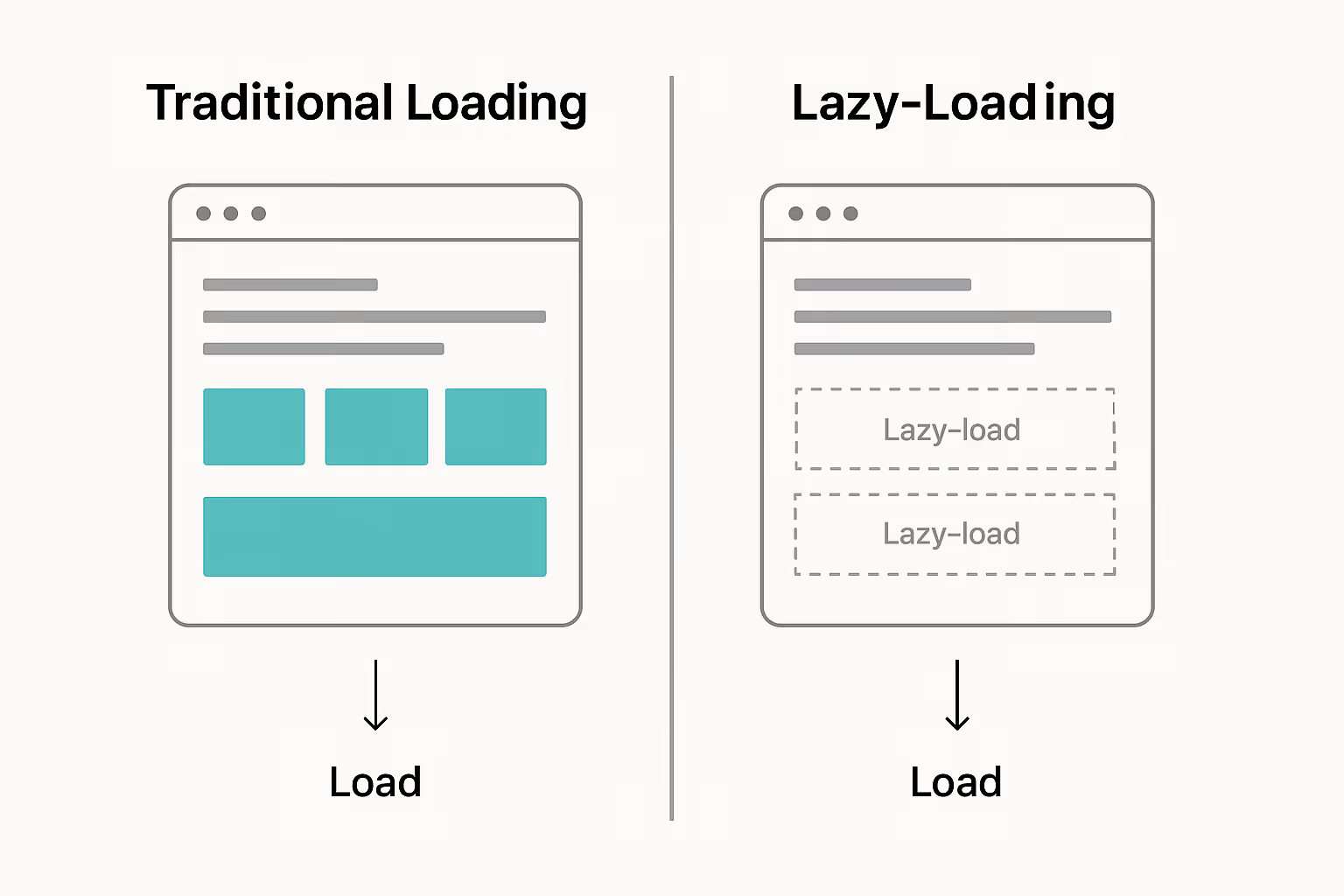
Lazy loading is a technique where images are loaded only when they are about to enter the user’s viewport, rather than all at once during the initial page load.
Implementation essentials:
- Use srcset and sizes attributes
- Define width and height to prevent layout shifts
- Lazy-load below-the-fold images using loading="lazy"
When implemented correctly, lazy loading can significantly improve overall page performance by reducing initial load time and resource consumption. However, it must be used carefully. Above-the-fold images, especially hero banners, should not be lazy loaded, as this can negatively impact your Largest Contentful Paint (LCP) score, a key Core Web Vital.
6. Alt Text Optimization: Accessibility + SEOThe power of Alt text
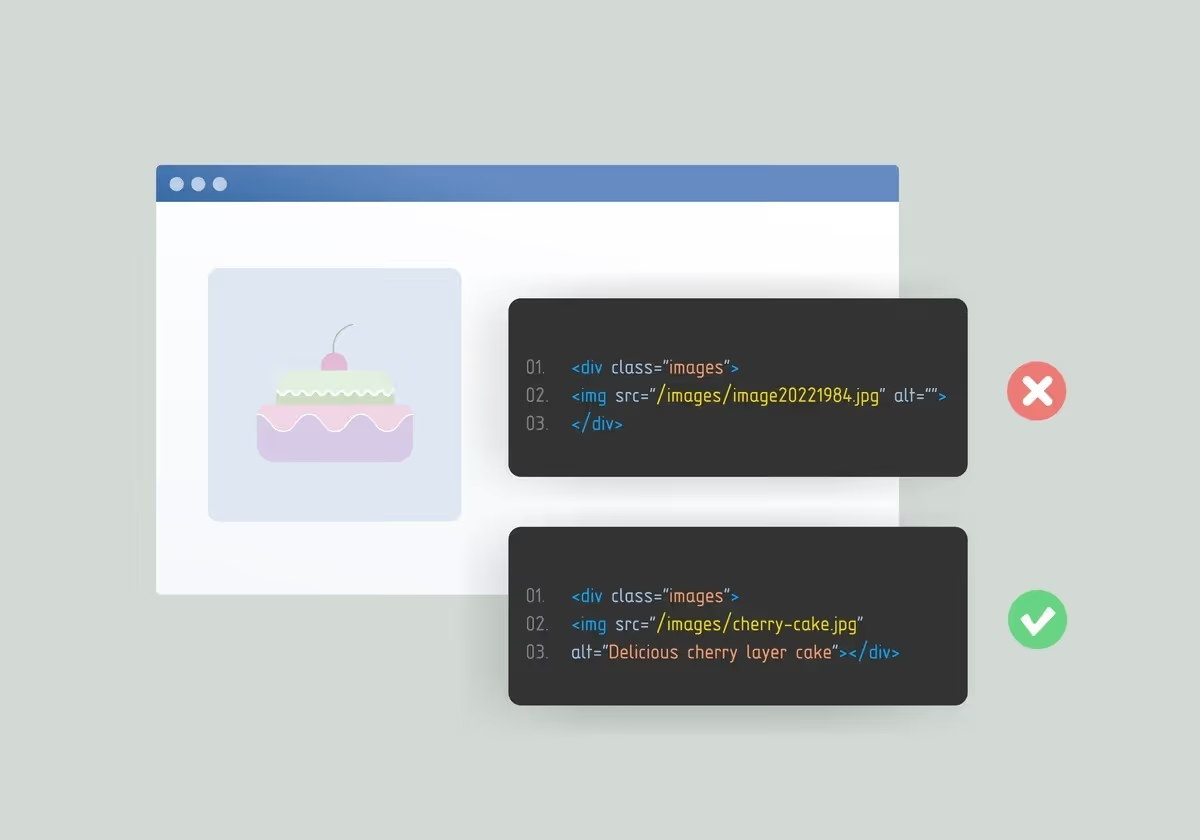
Alt text (alternative text) is one of the most important on-page elements for image SEO optimization. It plays a dual role: improving accessibility for users who rely on screen readers and providing search engines with clear contextual signals about an image’s content.
Effective alt text:
- Describes the image naturally
- Reflects the surrounding content
- Uses keywords only when contextually relevant
Bad example:
“SEO image optimization seo fast speed google ranking.”
Good example:
“A comparison chart showing file size differences between WebP and JPEG formats.”
Well-written alt text helps search engines associate images with relevant topics while ensuring a more accessible experience for all users. And it should describe meaning, not repeat keywords mechanically.

For more context on how visibility factors like optimized metadata and images affect search performance, check our Marketplace SEO in 2026: The Ultimate Playbook to Outrank Your Competition.
7. Image file names, captions & context
Search engines analyze image context holistically.
7.1. Smart file naming for image SEO
Search engines cannot visually interpret images the way humans do - they rely on textual signals in the code. If an image file is named IMG_8824.jpg, it provides no meaningful information about the image’s content.
Before uploading an image, rename the file to clearly describe what it contains using relevant, descriptive language.
- Bad: screenshot-1.jpg
- Good: image-optimization-for-seo-workflow.jpg
Always use hyphens (-) to separate words instead of underscores. Google treats hyphens as word separators, making file names more readable and easier to interpret for search engines.
Descriptive file names help reinforce topical relevance between the image and the surrounding content, supporting stronger overall image SEO optimization.
7.2. Captions and contextual relevance
While alt text primarily supports accessibility and search engine understanding, captions are designed for users. Studies consistently show that image captions attract more attention than body text, making them a valuable engagement element.
A clear, informative caption can encourage users to spend more time engaging with your content. Although engagement metrics such as dwell time are not direct ranking factors, improved user interaction often correlates with higher content quality signals.
In addition, search engines analyze the text surrounding an image to understand its relevance. Placing images near related headings and paragraphs strengthens contextual alignment and supports stronger image SEO optimization.
The importance of contextual signals becomes even more pronounced when comparing marketplace seo vs traditional seo, where scale and content complexity amplify the role of visual optimization.
8. Image Indexing, Sitemaps & Crawlability
Images are not guaranteed to be indexed unless they are discoverable.
8.1. Responsive images
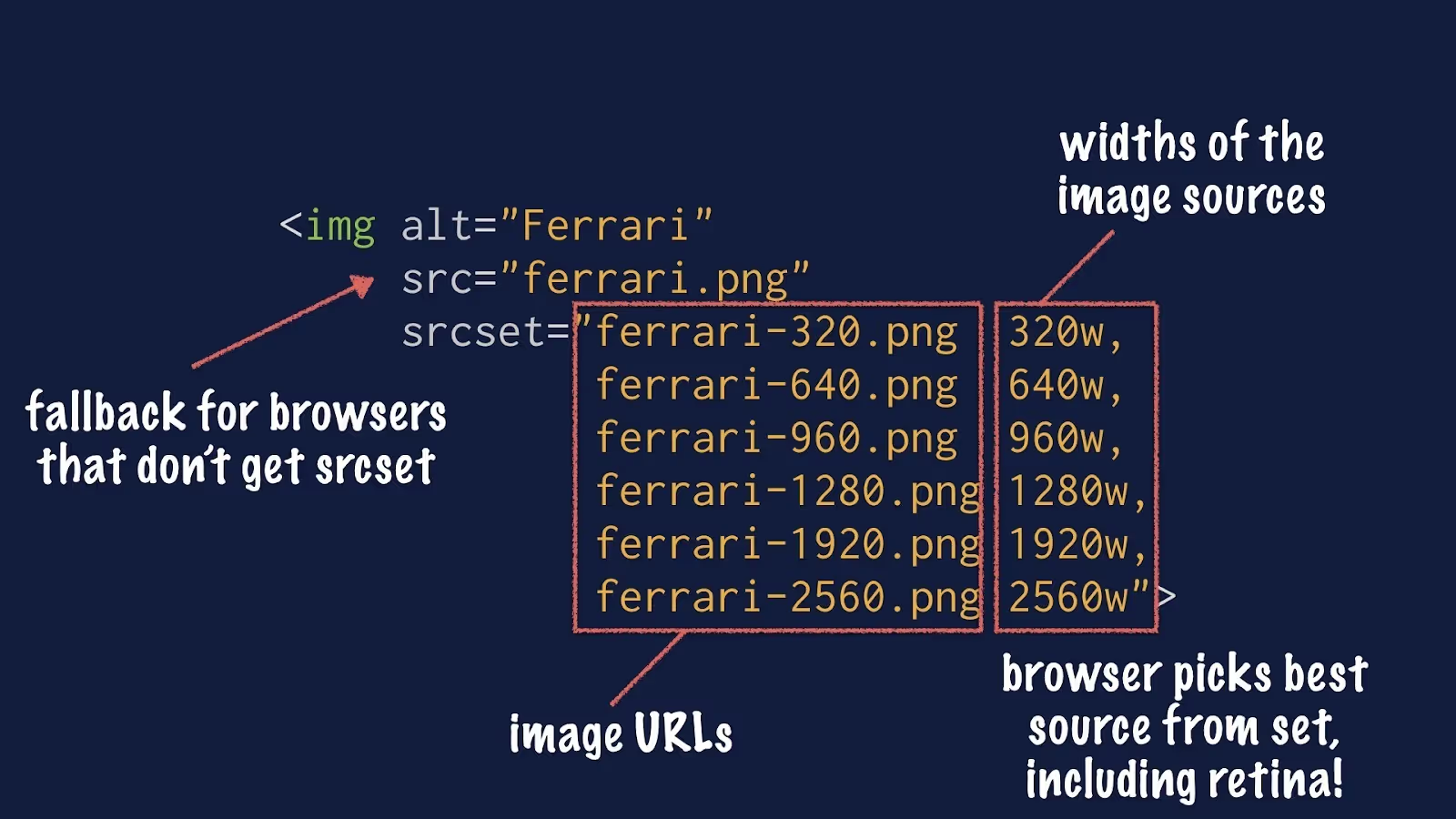
In 2026, mobile-first indexing is the standard. Loading a large 2000-pixel-wide desktop image on a mobile screen that only displays 400 pixels is inefficient and unnecessary.
Using the srcset attribute allows browsers to serve different image sizes based on a user’s screen resolution and device. As a result, mobile users download smaller files, reduce data usage, and experience faster page loads without sacrificing visual quality.
8.2. Create an image sitemap
If your website relies on JavaScript-based galleries, pop-ups, or large e-commerce product carousels, search engines may not discover all of your images through standard crawling.
An image sitemap helps search engines find and index images that might otherwise be missed. You can either add image tags to your existing XML sitemap or create a dedicated image sitemap to improve image discoverability and indexing reliability.
9. Structured Data for Images (ImageObject)
Alt text helps search engines understand what an image represents, while structured data provides additional context about how that image relates to the content on the page.
Although ImageObject schema alone does not create Rich Results, it enhances image clarity within supported schema types such as Product, Recipe, Article, and Video. When used correctly, structured data can improve how images appear in search features and increase click-through potential.
10. Visual Search & Google Lens Optimization
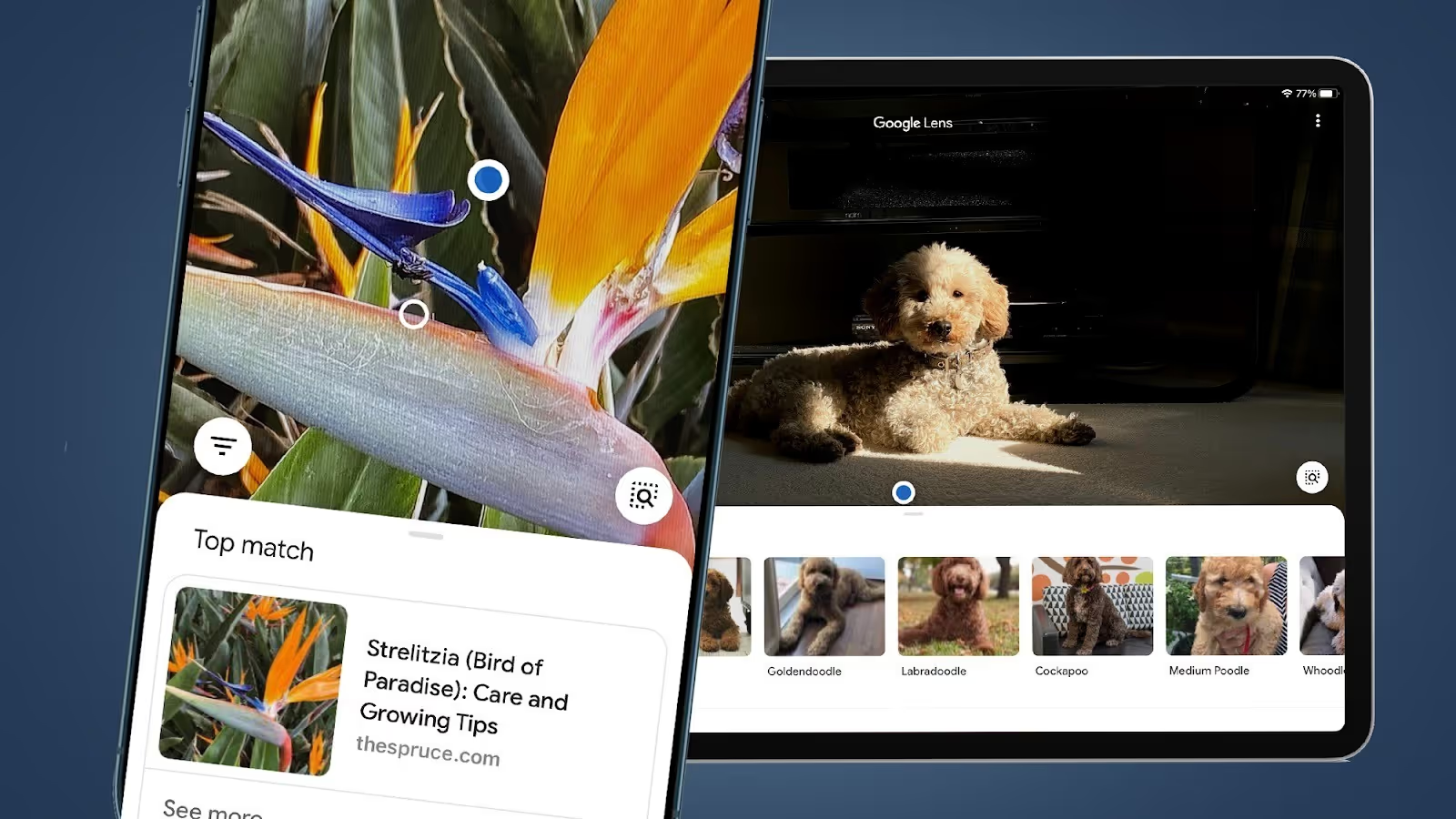
Visual search is growing rapidly through Google Lens and AI-powered discovery. Visual search allows users to search using images instead of text, which changes how images should be optimized for discovery.
- Use original and distinctive images
Unique images such as custom photos or branded graphics are easier for visual search systems to recognize and differentiate. When many websites use the same stock images, search engines have less reason to surface one result over another. - Keep the main subject clear
Images with a clear focal point are easier for visual recognition systems to understand. Avoid cluttered backgrounds, heavy watermarks, or large text overlays that may interfere with object detection. - Maintain sufficient image quality
Images should be clear enough for visual search algorithms to identify objects accurately. At the same time, they should be properly compressed to maintain fast load times and overall SEO performance
11. Image SEO Audit Checklist & Tools
A proper image SEO audit helps you uncover hidden performance bottlenecks, missed ranking signals, and accessibility gaps that often prevent pages from reaching the top 3 results.
Use the following tools to audit images from both a performance and search visibility perspective:
- Google PageSpeed Insights
Identify images affecting Largest Contentful Paint (LCP), oversized images, and formats that could be improved (e.g. missing WebP/AVIF). - Lighthouse (Chrome DevTools)
Run performance and accessibility audits to detect unoptimized images, missing dimensions, and layout shift issues caused by images. - Screaming Frog SEO Spider
Crawl your site to find:- Oversized image files
- Missing or duplicate alt text
- Incorrect image URLs and formats
- Squoosh / TinyPNG
Compress images manually before upload to maintain quality while reducing file size - especially useful for hero images and editorial visuals.
To deepen your audit practice beyond images and cover the full SEO stack, see our Marketplace SEO Audit.
12. How Journeyhorizon supports image otimization for SEO and scalable marketing growth
Journeyhorizon is a trusted partner for SEO audits and SEO optimization, including image optimization, helping businesses build a strong and scalable search foundation. This is why businesses should hire technical SEO Expert services in today's complex market.
We helps businesses improve search visibility by making image optimization a natural part of their SEO foundation. We focus on keeping images fast, clear, and search-friendly, so they support Core Web Vitals, improve on-page relevance, and still look great.
Beyond image optimization, our work extends across key SEO disciplines that support long-term, scalable growth:
- eCommerce SEO services to optimize product images, category pages, and performance at scale
- SaaS SEO services focused on speed, clarity, and conversion-driven content experiences
- Marketplace SEO for listing-heavy sites where image performance directly impacts visibility
- Hire Technical SEO audits to uncover image-related performance, indexing, and Core Web Vitals issues
- Content-driven SEO strategies that align visuals with search intent and user experience
To explore how these services fit together, view our Marketplace SEO services or our full range of marketing services on the Journeyhorizon website.
13. Final Thoughts: Image SEO as a Competitive Advantage
Image optimization for SEO is no longer optional. It is a ranking lever, UX enhancer, and discoverability multiplier.
Pages that treat images strategically - rather than as decorative assets - consistently outperform competitors in both traditional and AI-powered search results.
If you are serious about ranking in the top 3, image SEO must be embedded into your technical SEO, content strategy, and performance roadmap.
Need help implementing image SEO at scale?Journeyhorizon helps high-growth websites and marketplaces optimize images for speed, rankings, and AI-driven search visibility.
→ Contact Journeyhorizon to turn image optimization into measurable SEO growth.
14. Image Optimization for SEO: FAQs
1. What is image optimization for SEO?
Image optimization for SEO is the practice of improving image performance, relevance, and structure so search engines can better index images and rank pages higher.
2. How does image optimization improve SEO?
It improves page speed, supports Core Web Vitals, and increases visibility in image and visual search results.
3. What is the best image format for SEO?
AVIF and WebP are currently the best formats due to superior compression and performance benefits.
4. Is alt text important for image SEO?
Yes. Alt text helps search engines understand images and improves accessibility without affecting visual layout.
5. Does image optimization matter for small websites?
Yes. It is a simple, low-cost way to improve speed, usability, and search performance.
Discover how SEO works for small businesses.
.avif)
.avif)