Is Webflow Good for SEO? Complete Guide for 2026
.avif)
Is Webflow good for SEO? If you're evaluating website platforms for search visibility, Webflow has genuinely strong fundamentals. It generates clean, semantic code out of the box, includes native SEO controls, and its global CDN hosting supports fast load times without plugin bloat. But here's what most articles skip: the real question isn't whether Webflow is technically capable for SEO. It is. The real question is whether Webflow fits your growth strategy and who should actually be using it.
At Journeyhorizon, we work with marketplaces, SaaS teams, and digital businesses that need to combine product and marketing to scale sustainably. We've helped dozens of clients build marketing websites on Webflow alongside their core platforms – and the results speak for themselves. But we've also seen Webflow projects fail because teams weren't clear on what it's designed for. If you're considering Webflow for your business, this guide will help you understand exactly what you're getting, where it shines, and where it has real limitations.
What Webflow Actually Offers for SEO
Question Webflow good for SEO? starts with understanding what the platform provides natively. Webflow gives you control over the fundamentals that matter for search: page titles, meta descriptions, canonical tags, URL slugs, alt text, open graph settings, and robots meta tags. You also get a built-in global CDN (powered by Amazon Web Services and Fastly), which means fast page load times without having to configure separate hosting or worry about server speed degradation during traffic spikes.
The code Webflow generates is clean and semantic. There's no code bloat from heavy drag-and-drop page builders, and no plugin conflicts like you often see with WordPress. That efficiency translates to better Core Web Vitals, which Google has made increasingly important for rankings. You're also getting automatic SSL, XML sitemaps, and the ability to manage redirects – all standard SEO infrastructure that comes built-in rather than bolted on.
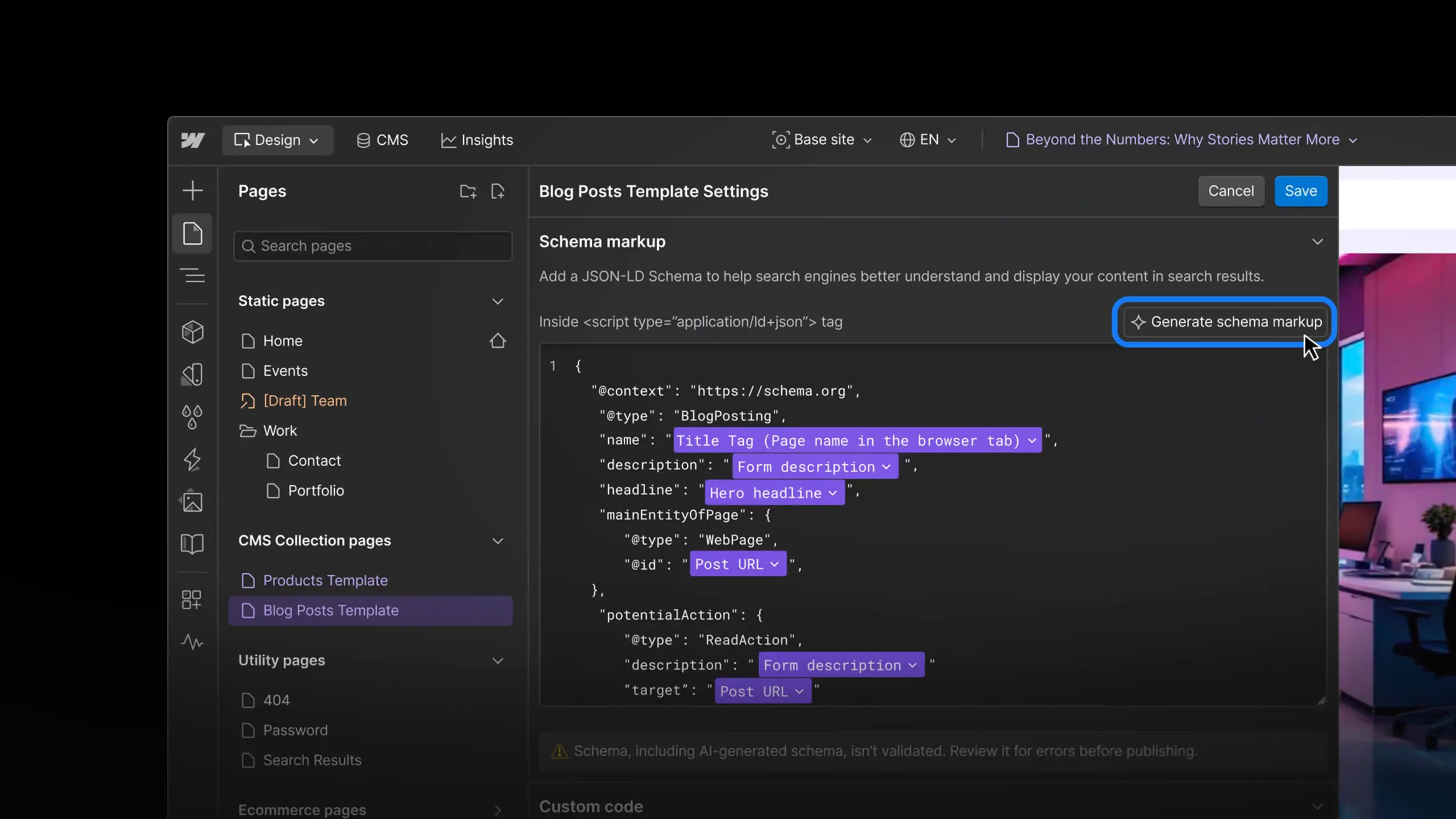
Webflow also includes native schema markup support and recently launched AI-powered SEO audit tools that flag missing alt text, page titles, and structured data. These tools automate some of the repetitive work that otherwise requires manual review or third-party plugins.
Why Webflow Stands Out Against Older Platforms
To answer whether is Webflow good for SEO compared to WordPress or other builders, you need to understand the trade-offs. WordPress powers 63% of all websites with a CMS, which speaks to its flexibility. But that flexibility comes with a cost: you're installing SEO plugins (Yoast, Rankmath, Semrush), caching plugins, image optimisation plugins, and managing potential conflicts between them. Your site performance depends on your hosting provider and how well you've configured everything.
Webflow strips away that complexity. The platform is designed as an integrated whole: design, hosting, CMS, and SEO controls in one environment. You don't choose your host separately. You don't layer on plugins. This makes Webflow especially valuable if you're building a marketing website that needs to be fast, visually sophisticated, and directly connected to your growth metrics – which is exactly what we recommend for marketplace founders and SaaS companies that need content-driven visibility.
Wix and Squarespace offer similar all-in-one convenience but give you less control over code and metadata. You're more constrained by their template system and limited in how much custom SEO configuration you can do. Webflow's visual editor lets you design complex, custom layouts without ever touching code, but it also gives advanced users access to custom code for full control. That balance is rare.
The Hard Truth: Webflow Isn't a Content Publishing Machine
Here's where many teams stumble when evaluating whether is Webflow good for SEO. The platform is excellent for publishing content. But if you're planning to run a high-volume content operation – publishing 20 blog posts a month, maintaining dozens of category pages, or building large-scale content hubs – Webflow's CMS can feel clunky compared to WordPress.
Webflow's Collections are powerful for structured content like product listings or team pages, and you can set up dynamic meta titles and descriptions. But the publishing workflow is slower than WordPress. Managing bulk content operations, importing large datasets, or handling complex editorial processes takes longer. If you're scaling content as your primary growth driver, you might spend more time managing Webflow than building your content strategy.
This is why we often recommend a hybrid approach: use a platform like WordPress or a headless CMS for your high-volume content hub, and use Webflow for your branded marketing site, landing pages, and conversion-focused pages. The two can work together beautifully – which is actually a strong SEO strategy because you're not betting everything on one platform's capabilities.
Where Webflow Fits in a Real Growth Stack
The real value of Webflow emerges when you stop thinking of it as a replacement for WordPress and start thinking of it as a specialist tool for specific jobs. Is Webflow good for SEO? It is – when you're using it for what it was designed for.
Webflow excels as the marketing layer for digital businesses. If you're a marketplace founder running your core platform on Sharetribe or custom-built infrastructure, you need a separate marketing website. That marketing site needs to rank for category keywords, educational content, and commercial intent searches. It needs to convert visitors into founders who understand your value. Webflow is almost ideal for this because you get complete design freedom, predictable fast performance, native SEO controls, and the ability to tie it all together without a separate hosting contract.
We work with clients who use custom app development for their core platform and Webflow for their marketing presence. The combination is powerful: your product is optimized for users, your marketing site is optimized for search and conversion. You're not forcing one platform to do everything. This modular approach is one reason we recommend it so often – it forces clarity about which platform does which job.
Common Misconceptions About Webflow and SEO
Before deciding whether is Webflow good for SEO for your business, let's clear up some myths that circulate in the community.
Myth: Webflow sites are slow. They aren't. Webflow's infrastructure is built on AWS and Fastly. Most unoptimised Webflow sites score in the 80s on Google PageSpeed Insights for mobile – which is solid. A poorly configured WordPress site will be slower.
Myth: You need to be a coder to make Webflow SEO-friendly. You don't. All basic SEO – titles, descriptions, alt text, slugs – is handled through Webflow's visual interface. Custom code is only needed for advanced features like complex structured data, and even then, Webflow's apps marketplace is expanding with pre-built solutions.
Myth: Webflow is too expensive for startup budgets. Webflow's hosting plans start at £12/month for a simple site, scaling up to £36/month for business sites with CMS. That's competitive with WordPress hosting plus the plugins you'd buy. If your issue is cash, it's not Webflow's pricing – it's the labour cost of building on the platform, which is real.
Myth: Webflow will tank your SEO if you migrate from WordPress. It won't – if you execute the migration properly. We've moved dozens of content sites from WordPress to Webflow with zero ranking loss because proper redirects and canonicalisation are straightforward in Webflow. The migration risk is operational, not technical.
The Right Way to Use Webflow for SEO
If you've decided is Webflow good for SEO for your business, here's the practical framework we use when advising clients.
First, be clear on scope. Is Webflow hosting your entire digital presence, or just specific properties? We recommend Webflow for branded marketing sites, category pages, and conversion-focused landing pages. If you also need to run high-volume content publishing, pair Webflow with a separate content platform. Both can rank; they're doing different jobs.
Second, plan your information architecture before building. Unlike WordPress, where you can add pages and reorganise later, Webflow rewards upfront planning. Know your keyword clusters, your content hierarchy, and your internal linking strategy before you start building collections. This prevents messy migrations later.
Third, automate metadata where possible. Webflow's template system for dynamic titles and descriptions is powerful – use it. If you're running a marketplace comparison site, a directory, or a product listing, invest time in setting up templates that automatically generate titles and descriptions based on your CMS data. This scales your SEO without multiplying your manual work.
Fourth, treat Core Web Vitals seriously. Webflow gives you good baseline performance, but there's always room to optimise. Image optimisation, lazy loading, and script placement matter. Test regularly and don't assume that because your site is on Webflow it's automatically fast.
When Webflow Is the Right Choice – And When It Isn't
Not every business should use Webflow. Understanding whether is Webflow good for SEO for your situation means being honest about your needs.
Webflow is the right choice if: You're building a branded marketing site that needs fast performance, custom design, and native SEO controls. You have a stable content strategy (not constantly adding hundreds of new pages). You want one integrated platform without plugin complexity. You value design flexibility and UX customisation. You're building a marketplace or SaaS marketing site alongside a core product on another platform.
Webflow is not the right choice if: You're publishing high-volume content daily and need rapid bulk updates. You need tight integrations with third-party tools through extensive APIs and webhooks. You have a strict budget and expect a free or very low-cost publishing platform. You need complete control over server-side code and infrastructure. Your team is entirely non-technical and needs the simplicity of pure drag-and-drop with no learning curve.
Many businesses sit somewhere in the middle. If that's you, consider whether you can split the job: run your high-volume content on one platform, your marketing site on Webflow, and link them strategically. Or build a staged roadmap: start with Webflow for your core marketing needs, then expand to a secondary content platform as your publishing volume grows.
Practical Next Steps
If you've decided Webflow is worth exploring, here's what to do. First, audit your current content strategy. How many pages do you need? How often are you publishing? How much custom design do you need? These answers tell you whether Webflow is solving a real problem or whether you'd be forcing a square tool into a round hole.
Second, test Webflow on a small project first. Build a single landing page or a small content hub. Get a feel for the interface, the CMS workflow, and whether the learning curve matches your team's capacity. Webflow has generous templates and documentation – use them.
Third, if you do choose Webflow, invest in proper SEO planning before you build. Don't wing it. Know your target keywords, your information architecture, and your technical SEO requirements. A few hours of planning saves weeks of rework later.
If you're evaluating Webflow as part of a larger growth strategy – especially if you're also building a custom platform, marketplace, or SaaS product – it's worth talking to a team that understands both sides. We specialise in helping businesses combine Webflow development with Sharetribe marketplace development and SEO strategy so everything works together. Whether you're starting from scratch or migrating from another platform, getting the architecture right at the beginning makes everything easier later.
Frequently Asked Questions
Is Webflow good for SEO compared to WordPress?
Webflow has cleaner code out of the box, faster hosting by default, and no plugin conflicts. WordPress is more flexible and better for high-volume content publishing. Webflow is faster and requires less configuration. Choose Webflow if you want an integrated, maintenance-free solution for a branded marketing site. Choose WordPress if you need to publish dozens of pages regularly or integrate deeply with third-party tools. Many businesses use both for different jobs.
Will I lose SEO rankings if I migrate my site to Webflow?
No – if you execute the migration correctly. Webflow makes redirects and canonicalisation straightforward. The key is planning the migration carefully: map all old URLs to new ones, set up 301 redirects, validate in Google Search Console, and monitor traffic for the first month. Done properly, you'll see no ranking impact. Done carelessly, you could lose rankings. The risk is operational, not technical.
Do I need to know code to use Webflow for SEO?
No. All basic SEO – titles, descriptions, alt text, slugs – is handled through Webflow's visual interface. Advanced features like complex structured data require custom code, but Webflow's growing apps marketplace is solving this. For 90% of businesses, you won't need to touch code at all.
Can Webflow handle a large blog with hundreds of pages?
Is Webflow good for SEO if you're running a large blog? Technically yes, but practically it's slower than WordPress. Webflow's CMS can handle hundreds of pages, but the publishing workflow is manual-intensive. If you're publishing 10+ posts per month regularly, consider pairing Webflow with a separate content platform or using WordPress instead. For smaller content operations, Webflow works well.