Rendering SEO for Marketplaces: A Technical Guide
.avif)
When you build a marketplace, every technical decision shapes how customers find you. One of the most overlooked decisions is how your platform renders pages for search engines. Rendering SEO isn't a niche technical topic, it is fundamental to whether Google can see and index your marketplace content at all. If your product listings, category pages, or dynamic content aren't rendering properly, search engines may miss them entirely, and your organic visibility suffers.
Journeyhorizon helps marketplace founders understand these technical foundations because they directly affect growth. This guide explains what rendering means for SEO, why it matters for your marketplace, and how to make the right technical choices.
What is Rendering in SEO and Why It Matters
Rendering SEO refers to how search engines like Google process your website's code (HTML, CSS, JavaScript) to convert it into a visible, interactive page. When Googlebot visits your marketplace, it doesn't just read raw HTML. It needs to execute your code to see the final layout, content, links, and structured data that users see in their browser. This process is called rendering.
Why does this matter for your marketplace? Modern platforms often load product listings, reviews, prices, and images dynamically using JavaScript. If Google can't render your pages properly, it may only see an empty shell or incomplete content. This means product pages don't get indexed, category pages lose their structure, and your marketplace effectively becomes invisible to organic search.
Rendering directly impacts SEO because it determines what content Google actually sees and evaluates. If critical information like product descriptions or category names only appear after JavaScript runs, delayed or failed rendering can push your rankings down or prevent indexing altogether.
How Search Engines Handle Rendering
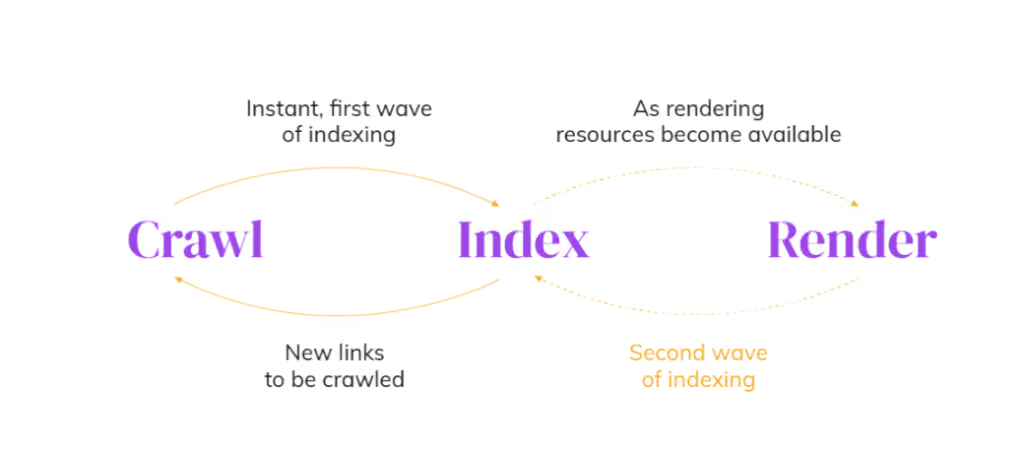
Google processes websites in three main phases: crawling, rendering, and indexing. Most SEOs focus on crawling and indexing, but rendering is where the actual content becomes visible.
When Googlebot crawls your marketplace, it first fetches the initial HTML. At this stage, it sees raw code and basic structure, but not the final page. The rendering phase happens next, where Google's rendering engine executes JavaScript to build the complete document object model (DOM), the same way a browser does. Only after rendering does Google see your actual product listings, prices, images, and links.
This creates a subtle but critical problem. Google's rendering capacity is limited. It uses a queue system, so your pages may not render immediately. Some pages get rendered within hours, others take days or weeks. During this gap, your marketplace could be indexed with incomplete content or not indexed at all. This is called the "two-wave indexing" problem, and it directly affects rendering SEO performance.

Server-Side Rendering vs Client-Side Rendering for SEO
There are two main approaches to rendering your marketplace, and they have very different SEO implications.
Server-side rendering (SSR) generates the complete HTML on your server before sending it to the browser or search engine. This means Googlebot receives fully-formed pages with all product data, descriptions, images, and metadata already included. SSR is the gold standard for rendering SEO because Google can crawl and index your content immediately without waiting for JavaScript to execute. For a marketplace with thousands of product listings, SSR means predictable, fast indexing.
Client-side rendering (CSR) sends minimal HTML to the browser, then uses JavaScript to load and display content. This approach works well for interactive features, but it creates rendering SEO challenges. Googlebot must wait for JavaScript to execute, resources to load, and the final page to render. During this process, rendering can fail due to missing resources, network timeouts, or JavaScript errors. When rendering fails, Google may see an incomplete page or blank content, which damages your marketplace's visibility.
The choice between SSR and CSR isn't just technical preference, it directly affects your organic visibility. SSR delivers predictable rendering SEO results. CSR requires careful optimization and monitoring to work reliably.
Dynamic Rendering as a Middle Ground
If you already have a CSR marketplace and can't easily migrate to SSR, dynamic rendering offers a compromise. This technique detects whether the visitor is a user or a search engine bot. If it is a bot, your server sends a pre-rendered HTML version of the page. If it is a user, the browser loads your interactive CSR version.
Dynamic rendering solves immediate rendering SEO problems because Googlebot always receives fast, complete HTML. However, it adds complexity and requires maintenance. You need to keep pre-rendered versions in sync with your live content, which becomes difficult as your marketplace grows. Most marketplace founders find that proper SSR or static generation is more sustainable long-term.
Common Rendering Issues That Impact Rankings
Several rendering SEO mistakes consistently damage marketplace visibility. Understanding them helps you avoid costly missteps.
Blocked JavaScript and CSS files are a common culprit. If your robots.txt or server configuration blocks JavaScript or CSS files that Googlebot needs to render your pages, the rendering process fails. Google sees incomplete layouts and missing content. Audit your robots.txt immediately to ensure rendering resources are not blocked.
Slow or missing resources cause rendering timeouts. If your marketplace loads images, APIs, or third-party scripts that take too long, Googlebot may timeout before rendering completes. This is especially common in marketplaces with heavy dynamic content. Fast resource loading is essential for reliable rendering SEO.
JavaScript errors break rendering entirely. Unhandled errors in your JavaScript code prevent the page from building correctly. Googlebot may see blank content or error messages instead of your product listings. Test your marketplace in Google Search Console's URL Inspection tool to catch these issues before they damage your rankings.
Lazy loading images and content is another rendering SEO trap. If your marketplace uses lazy loading to improve performance, images and content only appear when users scroll. Googlebot doesn't scroll, so it never sees lazy-loaded content. Rendering SEO requires balancing performance optimization with making content available to search engines.
How to Test What Google Sees
You cannot optimize rendering SEO if you do not know what Googlebot actually sees. Use Google Search Console's URL Inspection tool to check rendering quality on your actual marketplace pages.
In Search Console, paste a product page or category URL and click "Test Live URL." Google will render the page in real-time and show you exactly what Googlebot sees. Compare the rendered version with your actual page in a browser. If content is missing, images are blank, or links are gone, you have a rendering SEO problem that needs immediate attention.
The screenshot feature in URL Inspection is particularly useful for marketplaces. It shows the rendered page layout, so you can confirm that your product listings, prices, reviews, and call-to-action buttons are all visible to search engines. If your marketplace relies on dynamic content loading, this test reveals whether rendering is working correctly.
Test multiple page types: product pages, category pages, search results pages, and user profile pages. Different marketplace sections may have different rendering behavior. One broken page type can cascade into indexing failures across your entire catalogue.
Best Practices for Marketplace Rendering SEO
Marketplace platforms have unique rendering SEO challenges because they combine static content (category pages, navigation) with dynamic content (product listings, user reviews, inventory). Here are practical steps to ensure proper rendering across your marketplace.
First, minimize JavaScript SEO bloat. Every line of JavaScript your marketplace loads increases the risk of rendering failures and slows down the rendering process. Use only the JavaScript your marketplace actually needs. Defer non-critical JavaScript so it loads after the page renders. This improves both rendering SEO performance and page speed.
Second, serve critical content in initial HTML when possible. Product titles, descriptions, prices, and images should be included in the HTML your server sends, not loaded via JavaScript afterward. This ensures Googlebot sees them immediately. For dynamic content like reviews or inventory counts, consider server-side rendering or static generation of the most important marketplace pages.
Third, ensure all resources needed for rendering are accessible. Check your robots.txt file and verify that JavaScript, CSS, and image files required for rendering are not blocked. If Googlebot cannot download the files your marketplace needs to render, rendering fails.
Fourth, monitor rendering performance over time. Marketplace content changes constantly. New products get added, listings get updated, inventory changes. Use Google Search Console's coverage reports to catch indexing problems early. If your coverage rate suddenly drops, it often signals a rendering SEO issue.
If your marketplace handles high volumes of dynamic content, consider whether custom marketplace development with proper rendering strategies from the start makes sense. Retrofitting rendering SEO onto an existing marketplace built for CSR is expensive and time-consuming. Getting it right during development saves months of future troubleshooting.
Frequently Asked Questions
Does Google cache rendered pages or do I need to render every time?
Google uses a quota system for rendering resources. Popular pages get rendered more frequently, less popular pages less often. You cannot rely on Google re-rendering your pages on demand. This is why server-side rendering SEO is more reliable than client-side rendering. With SSR, your pages are already rendered and ready whenever Google crawls them.
How long does rendering take and does it affect indexing speed?
Rendering can take seconds to minutes per page, depending on complexity and resource availability. During the rendering phase, your pages stay out of the search index. This is why the "two-wave indexing" problem exists. Faster rendering means faster indexing. SSR pages typically index within hours or days. CSR pages may take weeks because Google must queue them for rendering.
Is rendering SEO different on mobile vs desktop?
Google primarily renders pages using a Chromium-based engine that resembles a mobile browser. Rendering SEO principles apply to both mobile and desktop, but your marketplace should be optimized for mobile rendering first. If your mobile version has different HTML or broken JavaScript, rendering SEO performance suffers.
Can I use pre-rendering tools to solve rendering SEO problems?
Pre-rendering tools like Prerender.io can help temporarily, but they are not a permanent solution. They create snapshots of your marketplace pages and serve cached HTML to search engines. As your marketplace grows and content changes, keeping pre-rendered snapshots in sync becomes unsustainable. For marketplaces with thousands of product listings and frequent updates, server-side rendering or static generation is more scalable.