Webflow Tutorial for Beginners: A Strategic Guide for Founders
Most business leaders treat website building as a checkbox task. You buy a template, hire someone to fill content, and hope it ranks. But this leaves money on the table. If you're running a marketplace, scaling a SaaS product, or building a brand that needs organic growth, your website isn't just a business card—it's a growth engine. The difference between a website that attracts customers and one that drains resources comes down to strategy and tools. A webflow tutorial for beginners isn't just about learning software; it's about understanding why the right platform can change your trajectory.
Journeyhorizon works with founders and marketing teams who've realised that legacy platforms—outdated WordPress setups, rigid site builders, expensive enterprise systems—are holding them back. These companies need speed, control, and the ability to test ideas without waiting weeks for a developer. That's where Webflow comes in, and why more marketplace founders and growth-focused businesses are choosing it over traditional alternatives.
Why Webflow Matters More Than You Think
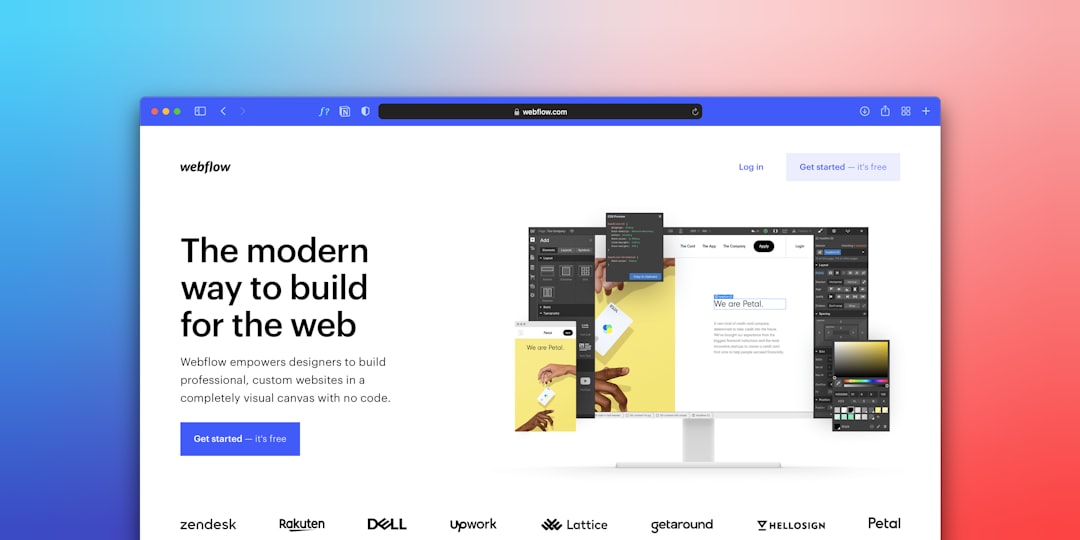
Webflow isn't just another website builder. It's a visual development platform that bridges design intent and technical execution. Unlike WordPress, which locks you into plugins and themes, or rigid no-code tools that limit flexibility, Webflow lets you build professional, custom websites without hiring a full engineering team.
For marketplace founders, this solves a real problem. Your marketplace platform might run on Sharetribe or another solution, but you still need a separate marketing website that ranks, converts, and scales. Webflow lets you build that marketing layer independently, with full design control, SEO capabilities, and the ability to iterate based on performance data. This combination of Webflow plus your marketplace platform creates a complete digital presence.
The speed advantage is significant. In traditional development, changing a button's colour requires a developer. Testing new landing page layouts means waiting for code review and deployment. In Webflow, you experiment in real-time and publish without bottlenecks. For early-stage founders on limited budgets, this efficiency translates directly into faster growth cycles.
The Real Cost of Getting It Wrong
Before diving into a Webflow tutorial for beginners, understand what's at stake. Many businesses underestimate the cost of choosing the wrong platform.
If your website is slow, you lose rankings and conversions. If it can't scale with your business, you'll eventually need a costly rebuild. If it doesn't integrate with your tools—CRM, analytics, payment systems—you're managing disconnected systems. WordPress requires constant maintenance, security updates, and plugin management. Costs compound as complexity grows. Rigid site builders give initial speed but leave you unable to differentiate beyond preset options.
Webflow avoids these traps. You're building on a modern, secure platform actively investing in features. You're not fighting legacy code. And you're not paying per change after launch—you maintain control over your asset. The platform evolves with your needs without forcing you through expensive migrations.
Building Foundations Before You Build
The biggest mistake beginners make is jumping into Webflow without clarity on what they're building. Before opening Webflow, know three things: Who is your audience? What action do you want them to take? How will you measure success?
If you're a marketplace founder, your marketing website audience is different from your platform's end-users. They're evaluating whether to use your marketplace, comparing you against alternatives, and looking for proof the platform works. Your website needs to answer those questions.
Next, plan your information architecture. How many pages do you need? What content matters most? What keywords are you targeting? In Webflow, structure affects both UX and SEO. A poorly organised site wastes visitors and confuses search engines. A well-structured site guides people toward conversion and helps Google understand your content hierarchy.
Understanding Webflow's Core Advantages
A webflow tutorial for beginners typically focuses on UI features. But the real advantages are strategic.
First, visual development speed. You build using drag-and-drop, and HTML and CSS are generated automatically. Non-developers can build functional sites. Developers can build faster without writing boilerplate code. For teams with designers and non-technical marketers, this democratises website control.
Second, responsive design is built in. You design intentionally for multiple breakpoints from the start—essential for SEO and user experience. This is a massive advantage over platforms treating mobile as an afterthought.
Third, SEO is native. You're not relying on plugins for metadata, structured data, or sitemaps. Webflow's technical foundation is SEO-friendly by default. Manage robots.txt, canonicals, redirects, and Open Graph tags directly. For businesses building authority through content, this matters enormously. Combine this with webflow SEO expertise, and you have a platform designed for organic growth.
Fourth, hosting is included. No server management, SSL certificates, or CDN configuration. Your site is fast by default, secure by default, backed by enterprise infrastructure.
Getting Your Team Up to Speed
Understanding three skill levels helps: designer-level (visual work), developer-level (advanced interactions), and editor-level (updating content).
If you're just publishing content and maintaining pages, Webflow is straightforward. For most teams, a webflow tutorial for beginners should cover fundamentals: navigating the canvas, understanding elements and layers, styling visually, building responsively, and publishing. The practical approach is training your core team deeply (usually your designer or lead marketer), then keeping the rest at "editor" level. This avoids everyone learning everything and prevents dependency on one person.
Common Mistakes Beginners Make
Overcomplicating structure is first. Beginners often create overly nested hierarchies or build pages instead of components. Webflow's strength is modularity and reuse—only if you actually use components consistently.
Ignoring mobile early is second. Design responsively from the start and test constantly on actual devices.
Neglecting SEO foundations is third. Page titles, meta descriptions, heading hierarchy, and semantic HTML matter from day one. You can't retrofit SEO onto poorly structured sites.
Treating content as an afterthought is fourth. Content shapes design. You need to know what you're saying before designing how it looks.
When to Bring in Specialists
You don't need to become a Webflow expert to launch successfully. Knowing what you don't know is as important as knowing the software.
If you're building a marketplace alongside a marketing site needing integration, you'll likely need custom app development expertise to connect Webflow seamlessly to a Sharetribe marketplace or custom backend. Agencies like Journeyhorizon bridge the gap between your Webflow marketing layer and your product platform, ensuring both systems work together as one cohesive growth engine.
If SEO is critical to growth—which it should be for most businesses—work with someone who understands both Webflow's platform and SEO strategy. The best technical setup is worthless if content strategy and keyword targeting are off.
If migrating from another platform while preserving rankings, you need expertise. Migration errors can wipe out years of SEO equity. Proper redirect mapping, canonical management, and Search Console validation aren't optional.
FAQ
Do I need to know code to use Webflow?
No. You can build professional sites purely through the visual interface. Some advanced features benefit from HTML, CSS, and JavaScript familiarity, but these are optional, not required for basic functionality.
Can Webflow handle large, complex sites?
Yes. Webflow handles sites with thousands of pages, complex CMS structures, and advanced interactions. Most businesses find it works brilliantly until they need deep backend logic or systems integration.
Is Webflow good for SEO?
Webflow is excellent for technical SEO. It generates clean code, handles responsive design properly, and includes native tools for sitemaps and structured data. A technical SEO specialist ensures you're leveraging Webflow's capabilities fully, especially in competitive markets.
Learning the basics through a webflow tutorial for beginners is an investment that pays dividends. You'll move faster, maintain control, and avoid the vendor lock-in of legacy platforms. If you're evaluating Webflow seriously and want to discuss your specific needs—especially if running a marketplace or scaling a digital product—Journeyhorizon can help you determine whether Webflow is right and how to execute properly.