What is Pagination SEO? Marketplace Guide to Best Practices

Pagination in SEO is one of those technical concepts that sits at the intersection of user experience, site performance, and search visibility. For marketplace founders, it's especially important because pagination directly affects how Google crawls your product listings, category pages, and content hubs. If you're building a platform where users browse large inventories or filtering options, pagination decisions will shape both your discoverability and your crawl efficiency.
In this guide, I'll explain what pagination is, how it impacts SEO, and the practical framework you should use to decide whether paginated content or alternative approaches like infinite scroll make sense for your marketplace. This is the kind of decision that often gets made during development, so understanding the trade-offs now will save you from rebuilding later.
What is Pagination, and Why Does it Matter for SEO?
Pagination SEO refers to how search engines discover, index, and rank pages within a series of linked content. When you split a large dataset—say, 500 products—across multiple pages of 20 items each, you create pagination. Users click "Next" or page numbers to move through the results, and search engines need clear signals about the relationship between these pages.
The traditional definition of pagination is simply dividing content across numbered pages. But from an SEO perspective, the challenge is ensuring that Google understands the structure, crawls the pages you want it to crawl, and doesn't dilute your authority across too many thin, duplicate pages.
For marketplaces, pagination matters because your product listings, category pages, and potentially your blog or help centre all use pagination. A well-structured pagination system can improve crawl efficiency and user experience. A poorly implemented one can trap content in what's called the "deep web"—pages that exist but never get discovered by search engines because they're buried behind paginated links.
How Pagination Impacts Crawl Budget and Content Visibility
Crawl budget is the number of pages Google will crawl on your site per day. If you run a large marketplace with thousands of products, crawl budget matters. Pagination can either help or hurt your crawl efficiency depending on how it's implemented.
If you have a category page with 100 pages of products, and each page is treated as a separate entity that needs to be crawled, you've just consumed 100 units of your crawl budget on one category. If your marketplace has 50 categories, you're looking at thousands of pages that Google might never crawl, especially if your overall site authority is modest.
This is why Google introduced the rel="next" and rel="prev" link attributes. By explicitly telling Google that page 2 is a continuation of page 1, you signal that these pages form a series. Google can then choose to treat them as a sequence rather than individual pages that each compete for attention.
However, Google's official guidance has also evolved. In 2019, Google stated that rel="next" and rel="prev" are no longer required and that they look at other signals (like links, content similarity, and URL structure) to understand pagination. This means the relationship between paginated pages is no longer as explicit as it used to be, placing more weight on the overall structure and content quality of the pages themselves.
For marketplace development teams, this means pagination strategy needs to account for how your category architecture is built, how links flow through your site, and whether you're creating thin or substantive pages.
Canonical Tags and Duplicate Content in Paginated Content
One of the most common pagination SEO mistakes is duplicate content. If page 1 and page 2 both have similar headers, descriptions, or metadata, search engines might view them as duplicates. This dilutes the authority that should concentrate on your primary content.
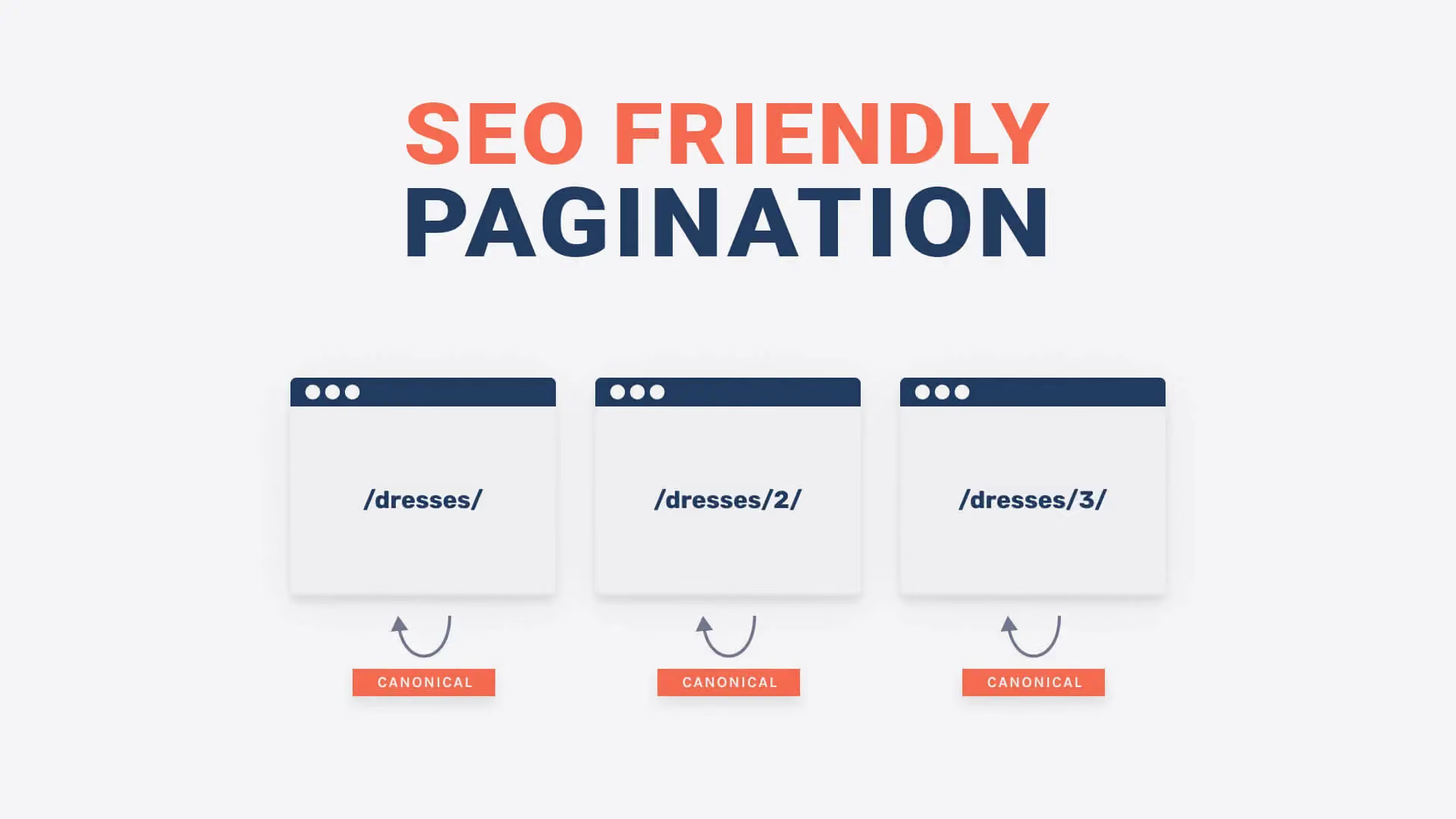
The standard solution is the self-referencing canonical tag. Each paginated page should point to itself as the canonical version. So page 1 has a canonical tag pointing to page 1, page 2 points to page 2, and so on. This tells Google that each page is the authoritative version of itself, not a duplicate of another page.
Some older guides recommend using a canonical tag pointing to the first page, or using rel="canonical" to point to a view-all or infinite-scroll version of the content. Google has discouraged this approach, as it removes authority from intermediate pages and can confuse your site structure.
In a marketplace context, this is especially important if you're filtering or sorting products. A category page with different sort orders (price low to high, newest first, best sellers) might produce similar-looking pages. Each variation should have its own canonical tag, and you should consider whether each variation deserves its own URL or if sorting should be handled client-side without creating new pages.
Pagination vs Infinite Scroll for Marketplace SEO
Infinite scroll has become popular on mobile devices and modern web apps. Instead of clicking "Next," users scroll down and new content loads automatically. This creates a better user experience for browsing but creates unique SEO challenges.
Infinite scroll doesn't naturally create distinct URLs for each "page" of content. Google struggles to find and index content that loads via JavaScript without explicit pagination links. If you're using infinite scroll, you need to implement structured data (like the hasPart schema) and ensure that individual product pages are discoverable through other means, such as category navigation or faceted search.
The practical trade-off is this: traditional pagination creates more URLs that Google must crawl, but it makes the structure explicit. Infinite scroll reduces the number of URLs but requires more sophisticated technical implementation to ensure discoverability.
For a marketplace where SEO is a primary growth channel, traditional pagination with clear structure usually wins. If your marketplace is primarily an app or highly interactive platform where mobile experience is paramount, infinite scroll with proper indexing strategies might be justified.
Best Practices for Marketplace Pagination
If you decide that pagination is right for your marketplace, here's how to implement it properly.
First, use descriptive page titles and meta descriptions. Each paginated page should have a unique title tag. "Products page 2" is unhelpful; "Women's Running Shoes: Pages 2 of 8" is clearer. Better still, include meaningful information: "Adidas Running Shoes Under $100, Size 6-12 Available."
Second, ensure that each paginated page has substantive content of its own. If every page looks identical except for the product list, Google may deprioritise intermediate pages. Include filters, category descriptions, or other contextual information that makes each page worth indexing.
Third, use internal linking strategically. Link from your category header to related content hubs, your blog, or curated collections. This helps distribute crawl budget to content that matters for authority-building, rather than diluting it across every page variant.
Fourth, consider whether you need to index every paginated page. If you have 200 pages of a product category, Google will likely never crawl all of them. You might noindex pages beyond page 5 or 10, and instead rely on faceted search or filters to help users navigate. This prevents crawl waste on pages that rarely receive traffic.
Fifth, implement structured data for your products. Use schema.org markup to tell Google about product prices, availability, and ratings. This helps individual products stand out in search results, even if the paginated page itself doesn't rank highly.
When to Reconsider Pagination
Pagination is not always the right answer. For some marketplaces, alternative approaches work better.
If your marketplace has a strong search feature, users might bypass pagination entirely and search for what they need. In this case, pagination serves only as a fallback, and investing heavily in pagination SEO may not be the best use of development resources.
If your marketplace has rich filtering and faceting—letting users narrow products by price, size, condition, or other attributes—each filtered result set becomes its own "page" without explicit pagination. Search engines struggle to crawl and index faceted results because the number of possible combinations explodes. For marketplaces with heavy filtering, you might limit indexing to broad category pages and let faceted searches exist as interactive features rather than SEO targets.
For content-heavy marketplaces like course platforms or knowledge bases, a different strategy might apply. Instead of paginating long content, you might split substantive guides into logically distinct pages with clear navigation and interlinking. This works better for SEO because each page adds unique value rather than simply chunking one large page.
Implementing Pagination with Development in Mind
The best time to think about pagination SEO is during the architecture phase of marketplace development. If you're building a Sharetribe marketplace or custom platform, pagination strategy should be defined before development begins, not retrofitted later.
Key questions to ask your development team:
Are paginated pages generating unique, valuable content, or are they thin duplicates? Will search engines benefit from indexing every page, or should you noindex deeper pages? How will internal linking and site structure guide both users and crawlers through your content? Are there alternative approaches—like infinite scroll with proper indexing, faceted search with limited indexing, or consolidated category pages—that better serve your growth goals?
If you're working with a technical SEO specialist and development team that understands marketplace architecture, these decisions become much clearer. The complexity of pagination in ecommerce and marketplace contexts often surprises founders who haven't built a platform at scale.
Pagination and AI Search Readiness
As AI-powered search engines and answer engines gain traction, pagination SEO takes on a new dimension. These systems rely heavily on structured data, entity relationships, and clear content hierarchy. Pagination that creates thin, repetitive pages is even more problematic for AI search because these systems need substantive, authoritative content to draw from.
If you're building a marketplace today, you should implement pagination with both traditional Google Search and AI search in mind. This means prioritising content quality, using structured data generously, and thinking about your overall information architecture—not just pagination mechanics.
The teams that win in modern search are those that treat pagination SEO as part of a broader content and technical strategy, not as a standalone problem. For marketplace founders, this is a good reason to involve SEO thinking early in the development process, rather than trying to optimise pagination after launch.
Pagination is a foundational choice for marketplaces, and getting it right sets you up for long-term visibility and scalability. Whether you're building with Journeyhorizon or another partner, thinking through these trade-offs now will save you from costly refactors later and ensure your marketplace can grow with your business.
FAQ
What is the best pagination strategy for marketplaces?
The best strategy depends on your marketplace type, but generally: use traditional pagination (not infinite scroll) if SEO is a primary growth channel; ensure each page has unique, valuable content; use self-referencing canonical tags; implement structured data for products; and consider noindexing pages beyond a certain depth to preserve crawl budget. Work with your development and SEO service partners to align pagination with your overall site architecture.
Does Google still care about pagination?
Yes, but differently than it used to. Google no longer strictly requires rel="next" and rel="prev" tags, but pagination structure still affects crawl efficiency and how Google understands your site. Clear URL structure, internal linking, and content quality matter more than the old HTML attributes. The fundamentals of pagination SEO have shifted from technical markup to architectural thinking.
Should I use infinite scroll or pagination?
Pagination is generally better for SEO because it creates explicit URLs and structure that Google understands. Infinite scroll creates a better user experience on mobile but requires sophisticated technical implementation to ensure search visibility. The choice should align with your growth priorities. If SEO is critical, choose pagination. If user experience on mobile is paramount and you have resources for proper indexing, infinite scroll may work with proper implementation.
How do I avoid thin content pages in pagination?
Make each paginated page substantive and unique. Add category descriptions, filter options, related content links, or curated product recommendations. If every page shows only a product list with no context, consider noindexing intermediate pages or consolidating content. Quality always matters more than quantity in modern SEO.